
PhosphorLive
v1.0 · macOS
A small tool · For live visuals

MIDI-triggered visuals, built for one band — then shared.

PhosphorLive plays video clips and procedural visuals on cue from a MIDI controller. Our drummer sends notes from the backing track; the app plays the matching visual, in sync, with GPU effects on top.

It's a macOS app. One person works on it. It's been running every show our band plays for about a year. I'm putting it out now so other small bands can use it without buying five-figure professional software.

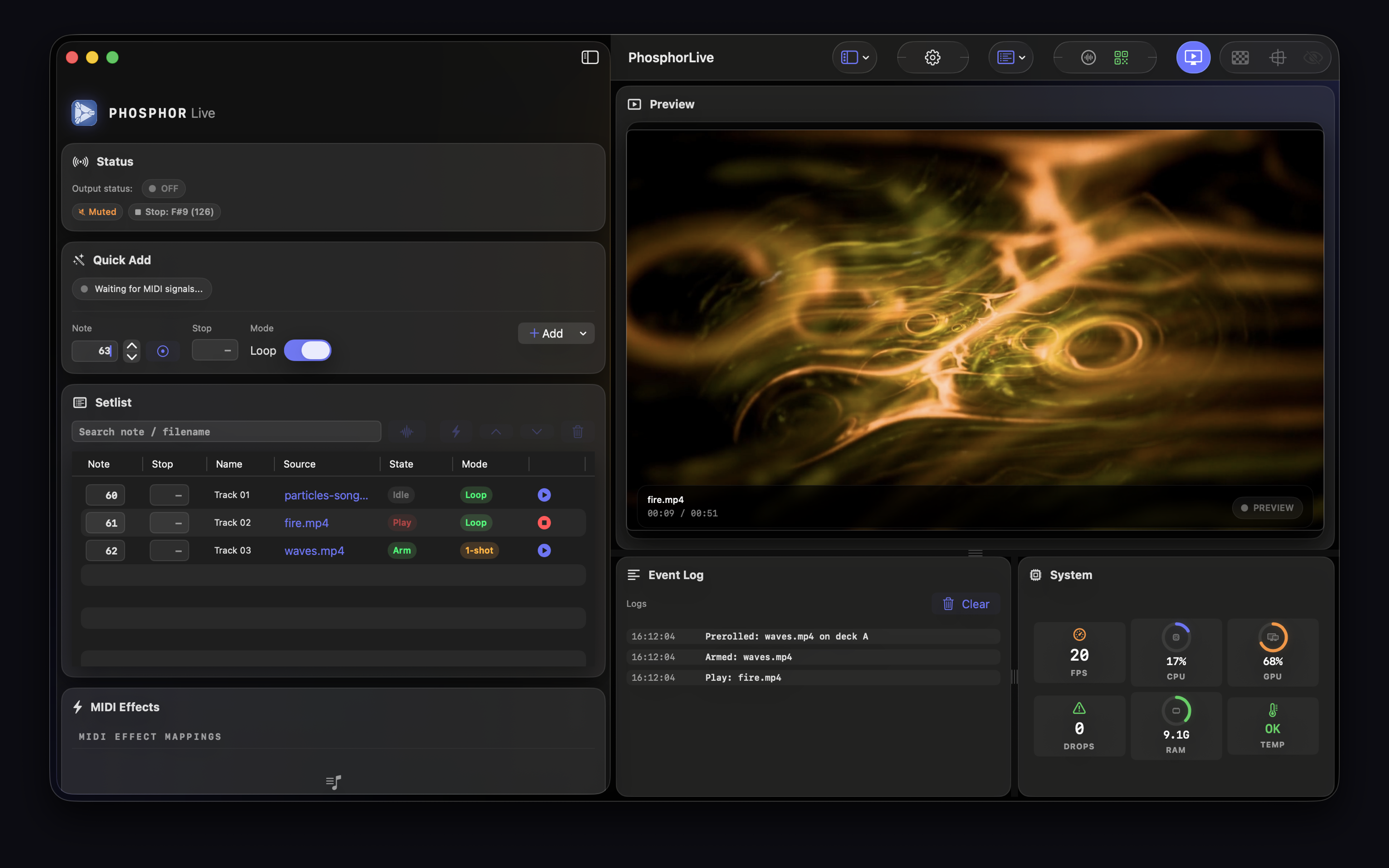
PhosphorLive main window: setlist on the left, live preview and system metrics on the right
Main window — setlist, preview, event log Fig. 01
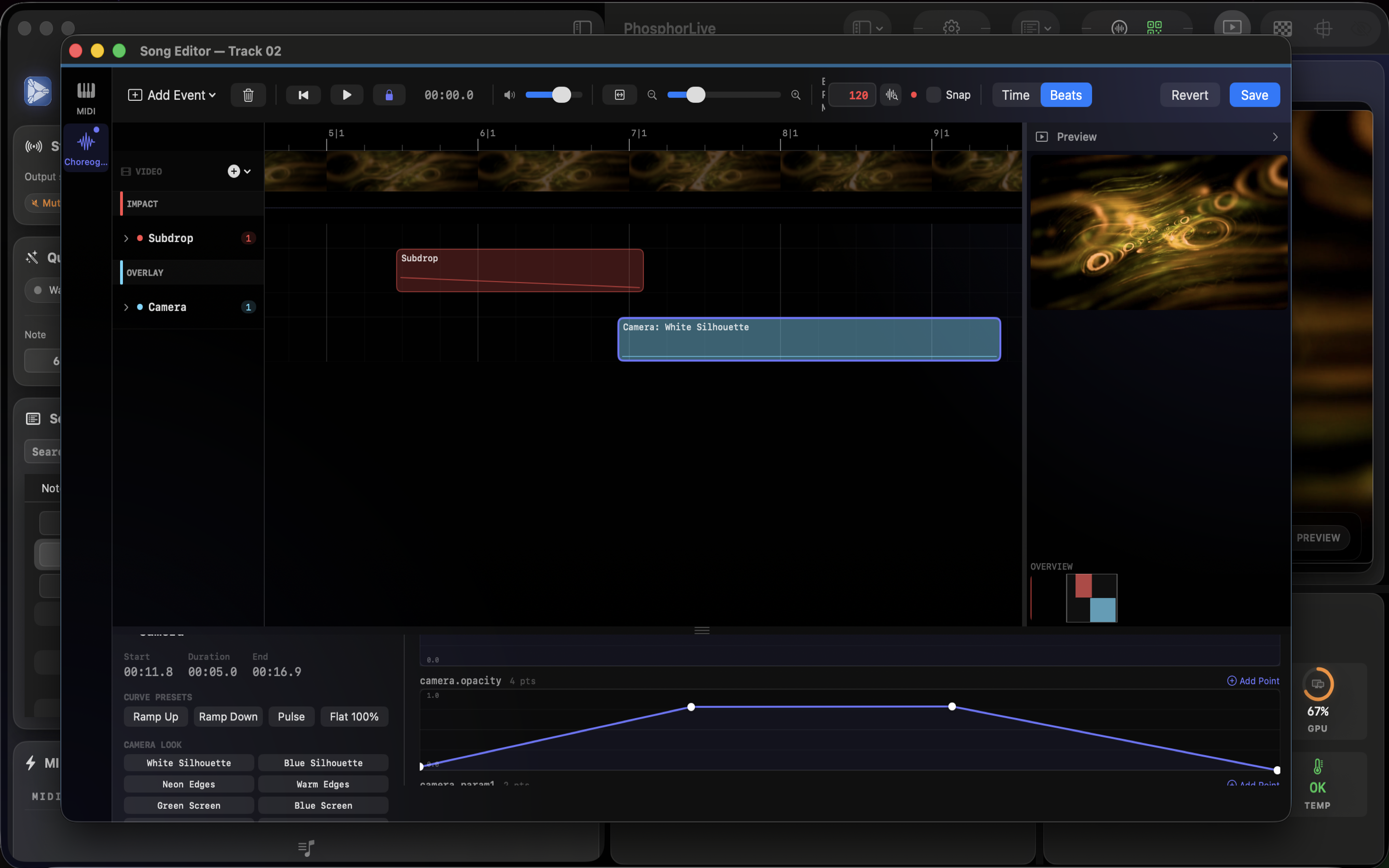
PhosphorLive choreography editor: timeline with impact and overlay tracks, curve editor below
Choreography editor — timeline & automation curves Fig. 02
01 / Story

I wrote this for a band I'm in. It works, so I'm sharing it.

Our band, Jaguar God, uses a backing track on stage. I play bass. Somewhere along the way we wanted visuals behind us that actually lined up with the music — not a looped VJ reel, but cues that hit on the drop, the breakdown, the bridge.

The off-the-shelf options were either thousands of euros, or stitched together from three separate apps that didn't talk to each other well. So I wrote one that does exactly this thing. It listens to the MIDI that's already coming out of our backing-track rig, and it plays the clip assigned to that note. Press a note, see a visual.

That was the first version. Since then I've added the choreography editor (automation lanes, curves, camera looks), a GPU particle system, nineteen effects, audio reactivity. I'm a bassist, not a studio — but I like writing software, and I've been enjoying this a lot. I want to keep going.

The goal isn't to compete with Resolume or MadMapper. It's to give small bands a path to good-looking, tightly-cued visuals that doesn't require a dedicated VJ or a five-figure software budget. That's it.

02 / What it does

The short version.

01
MIDI & OSC triggersVelocity-sensitive, sub-100 ms.
02
19 GPU effectsGlitch, RGB split, kaleidoscope, shockwave, strobe.
03
8 generatorsNoise, plasma, spirals, digital rain, audio-reactive.
04
Choreography editorTimeline with automation curves per song.
05
A/B crossfade decksPreloaded standby for instant switching.
06
Camera overlayLive webcam in, GPU-processed.
07
Custom shadersDrop in your own Metal compute shaders.
08
Setlist projectsSave and load complete shows.
03 / Live use

Running every Jaguar God show.

Every feature in PhosphorLive has been used on stage before it shipped. If it survives a Jaguar God set — sweaty venue, cheap HDMI, last-minute setlist change — it gets into the release. If it doesn't, it gets fixed.

Live with

Jaguar God

The band PhosphorLive was written for. Backing tracks, MIDI cues, visuals on every song. Listen below.

04 / Get it

Try it free, then buy if it works for you.

Two ways to get it. Either the direct download — runs as demo until you activate a license, then the full version. Or via the Mac App Store, sandboxed and auto-updated.

PhosphorLive (Direct) Free demo · €39 to activate
Download and run as demo with a watermark on the output. Activate a license inside the app to remove the watermark and unlock Syphon for routing into MadMapper, Resolume or OBS. Ships with Syphon, no sandbox.
Download
Mac App Store €39 · one-time
Sandboxed build, auto-updates through the store. No Syphon (sandbox restriction). Available worldwide.
Open App Store
REQUIRES  ·  macOS 14 Sonoma or later  ·  Metal-capable GPU  ·  Apple Silicon mandatory  ·  any class-compliant MIDI source
05 / FAQ

Honest answers.

Who's behind this?

One person. Me — Martin Schmid. I play bass in Jaguar God and I write software. No company, no team, no investors. I do this in the evenings and between tours.

Is it actively maintained?

Yes. I use it every time my band plays, so it has to work. I'm actively adding features — the choreography editor is the newest, particle system came before that, audio reactivity before that.

If you hit a bug, email me. I'll usually see it within a day.

What does it cost?

A one-time price, not a subscription. Pricing is set on the App Store / download page — same for both editions.

Why should I trust a one-person app for a live show?

Honestly — you shouldn't, blindly. Try it on a rehearsal first. But the single-developer thing cuts both ways: there's no roadmap committee, no feature getting deprecated because a PM left, and the person fixing bugs is the person who wrote them and the person depending on them on stage.

Will it work with my MIDI / DAW / setup?

If it speaks MIDI or OSC over the network or USB, yes. We trigger it directly from a sample pad on stage, but anything that sends notes works. Grab the free demo from this page first to verify your rig before committing.

Can I request a feature?

Please do. I pick what to build next based on what I need for my own shows and what users actually ask for. Email me: support@phosphorlive.com.

If you're in a small band, playing to backing tracks, and you want visuals that actually hit on the beat without spending the price of a guitar on software — I hope this is useful to you.

If something's missing, tell me. I'm easy to reach.

— Martin Bassist, Jaguar God · Developer, PhosphorLive

TweaksPhosphorLive site